
If you are looking for an Obsidian Copilot alternative, start by updating the question.
Copilot for Obsidian is no longer just a free plugin that puts a BYOK chat panel beside your notes. It now has a free tier, a paid Plus tier with a hosted model and agent features, a Supporter tier, and a separate v4 agent preview.
That matters because an old comparison can send you toward another plugin for a feature Copilot now offers.
I build SystemSculpt, so I have an obvious bias. My goal here is to make the decision narrower and more honest: which current product shape fits the work you want to do in your vault?
The short answer
Stay with or choose Copilot Free if you mainly want chat, vault question answering, provider choice, and an open-source plugin, and you are comfortable supplying model and embedding access. The current Free tier does not include agents or tool use.
Choose Copilot Plus if you like Copilot's interface but want its hosted chat model, broader document support, web search, project context, and current agent features. Copilot's official pricing page is the source of truth for what sits in Free, Plus, and Supporter.
Consider SystemSculpt if your workflow combines chat with managed semantic indexing, audio transcription, image generation, document processing, and reviewable vault tools under one license. No workflow requires a separate provider account or API key.
If Copilot already solves your actual job, switching for novelty is not useful.
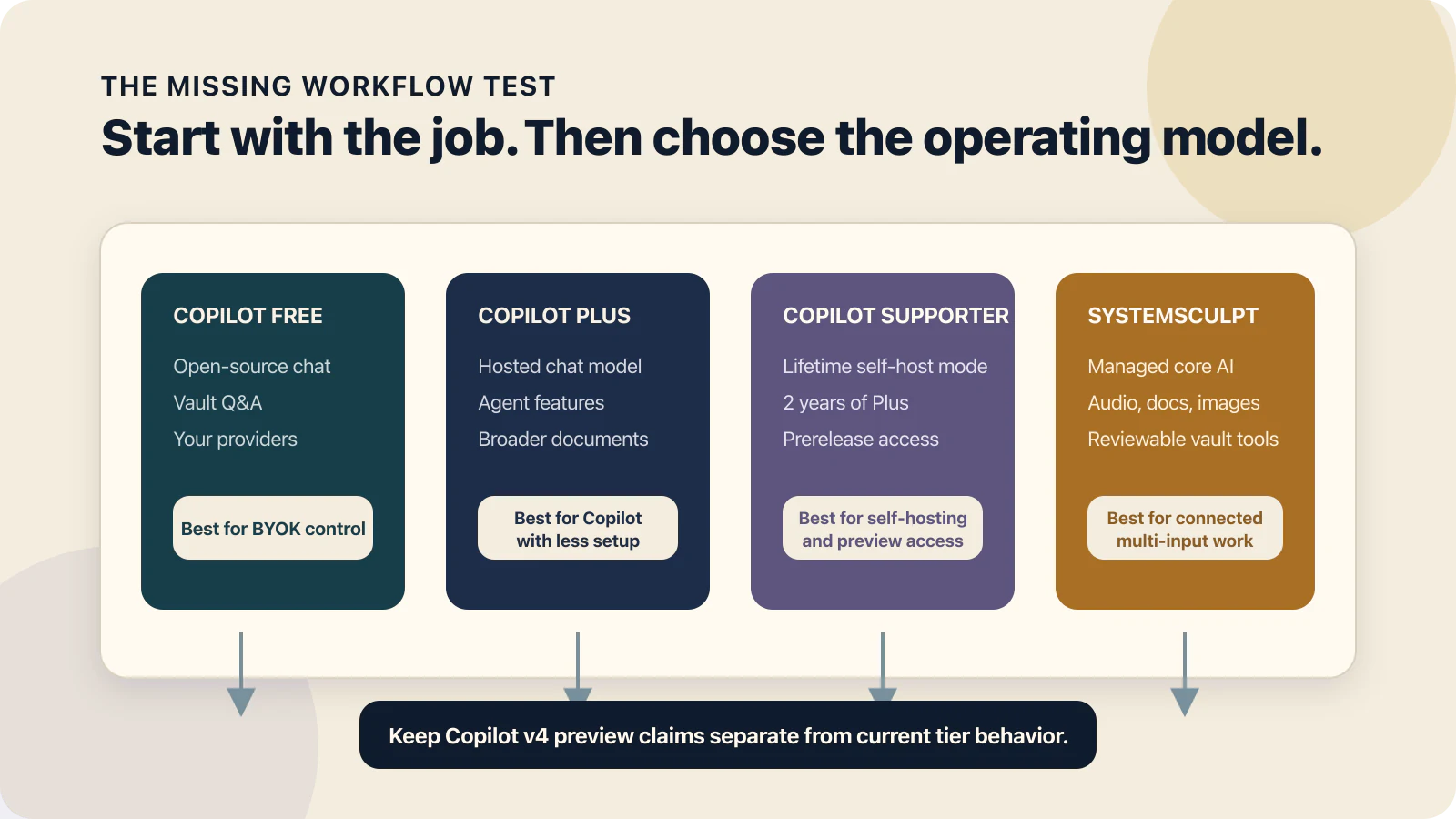
Start with the missing workflow, then compare the operating model that supports it.
Copilot now has three purchasing paths and a v4 preview
The old "Copilot is free BYOK" summary is incomplete.
| Copilot path | Current product shape | Setup and cost |
|---|---|---|
| Free | Open-source chat, image-capable models, Markdown vault search, and user-selected providers, without agents or tool use | $0 for the plugin, with your own model and embedding access |
| Plus | Built-in chat model, expanded vault search, agent features, web search, project context, and broader document support | $14.99 month to month or $139.99 billed yearly |
| Supporter | Lifetime self-host mode, 2 years of Plus, priority support, and prerelease access | $349.99 one time |
Those tier boundaries come from Copilot's current pricing page, not from an older roundup.
Copilot v4 needs a separate label. Its official preview page says the release is coming in summer 2026 and gives Supporters prerelease access. It describes OpenCode, Claude Code, and Codex inside the vault, shared skills and MCP servers, vault-scoped access, staged file changes, and an offline local-model path.
Those are meaningful capabilities. They are also preview claims, not a reason to describe the current Free or Plus experience as if v4 has reached general availability.
Copilot and SystemSculpt now overlap more than they used to
A fair current comparison looks like this:
| Decision area | Copilot for Obsidian | SystemSculpt |
|---|---|---|
| Chat | Free BYOK chat or a Plus-hosted model | Managed SystemSculpt Chat |
| Vault retrieval | Free Vault QA with your model setup, plus expanded search in Plus | Managed embeddings with blended lexical and semantic search |
| Agents | Agent features in Plus, with a larger v4 agent redesign in preview | Agent mode with vault tools, MCP connections, and approval controls |
| File changes | Composer and agent surfaces vary by tier; v4 preview explicitly stages writes for review | Ask Approval can pause mutating tools; Full Access is an explicit opt-in |
| Provider choice | Strong BYOK and local-model flexibility, plus a hosted Plus model | Fully managed; no provider accounts or API keys |
| Documents | Markdown in Free; broader formats and document reading in Plus | Managed document processing and vault-backed chat context |
| Audio transcription | Not listed as a core recording and transcription workflow on the current pricing page | Managed recording, imported-audio transcription, and vault output |
| Image workflow | Image understanding in supported Copilot models | Managed image generation that returns assets to the vault |
| License | Free, Plus, and Supporter paths | $19 per month or $149 one time, with separate hosted-work credits |
The gap is not "chat versus agents" anymore. Both products now cover retrieval and agent work.
The useful difference is how each product packages model access, file-change review, hosted processing, and the non-chat work around your vault.
Setup is a choice between flexibility and a managed core
Copilot gives you more ways to choose who runs the model.
The Free tier asks you to bring a provider key. Its repository documents OpenRouter, Gemini, OpenAI, Anthropic, and Cohere setup, and its current README also describes local and OpenAI-compatible model paths. That is attractive if you already manage providers or want to choose a model for each task.
Copilot Plus reduces that setup with a bundled chat model and embeddings. The Supporter path adds self-hosting and preview access. This means "Copilot requires API keys" is no longer a complete statement either.
SystemSculpt takes a managed-core approach. Activate one license, then its core chat, embeddings, transcription, document, and image services run through SystemSculpt. The SystemSculpt documentation and managed AI guide explain that service boundary.
There is no bring-your-own-key path in SystemSculpt. Its managed workflows run through the SystemSculpt service, so there is no provider account to create and no model to connect. On desktop, Chat and Studio can optionally run on the Codex app already installed on your machine, using that machine's own Codex login and model choice instead of the managed service.
Choose flexibility if you enjoy tuning providers, local models, and cost. Choose the managed core if configuration is the part that usually stops the workflow from becoming routine.

The setup choice is modular control on one side and a connected managed core on the other.
Retrieval quality depends on the setup you will maintain
Both products search beyond exact filenames and phrases, but the maintenance model differs.
Copilot's Vault QA documentation describes a local vault index that uses the chat and embedding models you configure. It notes that large-vault indexing can take time and that paid embedding providers can create usage costs. Copilot's newer product material also says basic search can work without building the semantic index first, with embeddings remaining optional.
SystemSculpt runs embeddings through its managed service and blends those results with lexical search. You still choose vault exclusions and decide what belongs in the index, but you do not choose an embeddings provider or paste an embeddings key into Obsidian. The embeddings and search guide covers exclusions, indexing, and fallback behavior.
The practical test is not which product uses the word semantic. It is whether you will keep the index healthy and whether the results expose enough context to verify the answer.
Test both against three notes you know are hard to find. Use one exact phrase, one paraphrase, and one question that requires two notes. A retrieval feature earns its place when it finds the right material and lets you inspect the source.
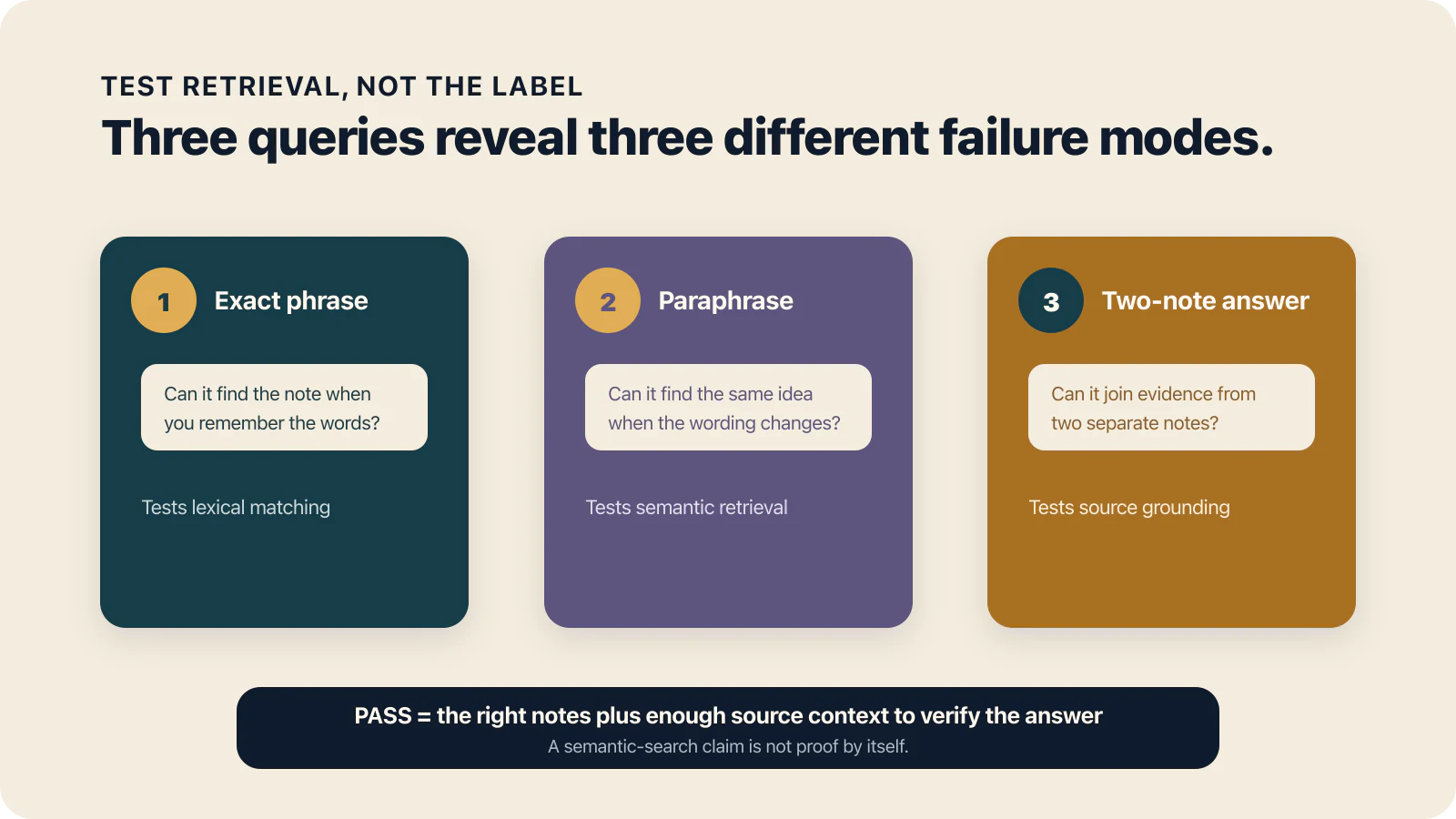
A useful retrieval test checks exact recall, semantic recall, and evidence across two notes.
File-change review is a version-specific question
This is where stale comparisons become risky.
Copilot Plus already has agent and Composer surfaces. Copilot v4 goes further: its preview page says create, rename, modify, and delete operations wait as readable changes before they touch a note, with trusted workflows available as an opt-in.
That is close to the review boundary I care about in SystemSculpt.
SystemSculpt's current agent surface can run with Ask Approval or Full Access. Ask Approval groups related tool calls into a review step. Full Access is for a workflow where you have intentionally allowed direct execution. The chat workspace guide documents tool calling, MCP connections, and approval controls. The vault workflows guide shows how those controls fit into repeatable file work.
Do not compare a generally available tier on one side with a prerelease promise on the other. Ask four concrete questions instead:
- Which version and tier am I evaluating?
- Which file operations can it perform?
- Does a write wait for review by default?
- Can a trusted workflow bypass review, and is that choice visible?
Then test with a disposable note. Ask the agent to change one sentence, rename the file, and delete it. The interface should make the consequence clear before the last step runs.

A safe workflow keeps the proposed change inspectable until you approve the consequence.
The non-chat workflow may decide the comparison
If your work stops at asking questions and editing prose, Copilot is a strong fit. Its current product covers chat, vault search, images as context, projects, web sources, document reading in Plus, and agent tasks.
SystemSculpt becomes more distinct when the input is not already a clean Markdown note.
Its managed workflows include:
- recording or importing audio and saving a searchable transcript
- processing PDFs and supported documents into vault context
- generating images and returning the output to Obsidian
- indexing notes for blended lexical and semantic retrieval
- letting an agent propose file actions inside the same chat workspace
The audio transcription guide and image generation guide show those workflows in more detail.
This is not a reason to pay for a larger surface you will not use. If you only need chat and vault Q&A, Copilot Free or Plus may be the tighter choice. If meetings, source files, images, and reviewed vault actions belong to the same weekly loop, SystemSculpt's packaging is easier to justify.

The larger workflow matters when several input types must become one reviewed vault result.
Privacy depends on the mode, not the logo
Neither product has one universal data-flow answer.
Copilot's privacy policy separates three paths. Requests sent to a provider you configure go directly to that provider. Brevilabs-hosted Plus models and features pass through its backend and enterprise model providers, with transient processing and no model training or prompt retention according to the policy. A fully local model path keeps the request on your device.
SystemSculpt's privacy policy says hosted AI features process the prompts, notes, files, audio, URLs, transcripts, and other context you choose to submit. It also describes limited operational telemetry and retention windows for hosted jobs.
So the honest privacy question is: which mode will you actually use?
For sensitive work, map the path before importing the note:
vault note -> plugin -> selected model or hosted service -> result -> vault
Identify who runs the model, which content leaves the device, what is retained, and which local alternative exists. A vague "local-first" label cannot answer those questions by itself.
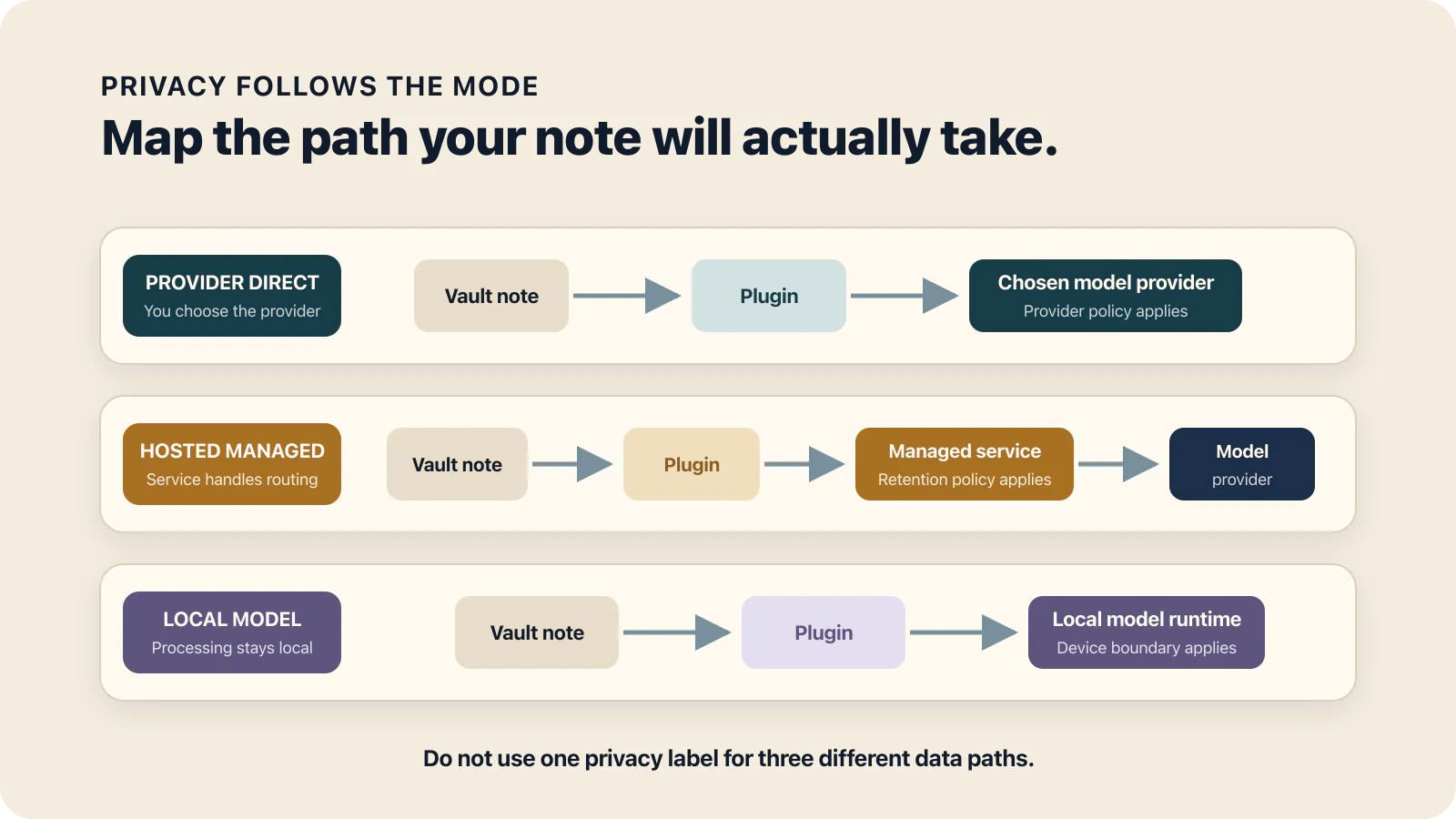
Privacy depends on the path your note takes, not one broad label for the product.
Pricing only makes sense against your real workflow
Copilot Free is difficult to beat if you want open-source chat and vault Q&A and already have model access. Your cost is the provider usage and the time you spend maintaining the setup.
Copilot Plus lists $14.99 month to month or $139.99 billed yearly. Supporter is $349.99 one time for lifetime self-host mode, 2 years of Plus, and prerelease access, subject to the current terms on its pricing page.
SystemSculpt costs $19 per month or $149 one time. Both licenses unlock the same product on up to 5 personal devices. Hosted work such as transcription, indexing, document processing, and image generation uses separately purchased credits. The pricing page keeps the current license and credit details together.
Do not compare only the sticker prices. Include provider usage, hosted credits, setup time, and the workflows you would otherwise run in another tool.
If you are uncertain, keep the lower-commitment path. Free Copilot is a sensible starting point for BYOK chat. Monthly SystemSculpt is the safer way to test its broader workflow before deciding whether lifetime access fits.
Who should stay with Copilot
Copilot is the clearer choice when:
- you want a free and open-source chat surface
- you already manage model keys or a local model
- vault Q&A, projects, and writing are the center of your workflow
- you want Copilot Plus features without moving to another interface
- you want to test the v4 preview and accept prerelease constraints
If that describes you, switching products adds migration cost without solving a real problem.
Who should consider SystemSculpt
SystemSculpt is the clearer fit when:
- you want managed core AI without choosing a provider for each workflow
- transcription, document processing, and image generation belong inside the vault loop
- you want Ask Approval available for mutating vault tools
- a $149 lifetime license is more comfortable than recurring license billing
- you are comfortable buying hosted credits when metered work creates processing cost
The limitation matters too. SystemSculpt is not the right choice if provider freedom or a fully local model path is your main requirement. Copilot gives you more flexibility there.
What could change after you read this
This comparison is based on first-party product pages, documentation, repositories, and policies checked on July 24, 2026. I did not rely on an old provider article body.
Three details can change quickly:
- Copilot v4 is a preview with a stated summer 2026 release window.
- Copilot tier prices and included Plus usage can change.
- Agent permissions can differ between a stable release and a prerelease build.
Before choosing, reopen Copilot's pricing and v4 pages, confirm the current SystemSculpt pricing and model-access facts, and run the disposable-note file-change test in the plugin versions you can install.
The decision comes down to the missing workflow
Do not switch because one product has a longer checklist.
Name the missing workflow.
If it is "I want open-source chat and vault answers with my provider," start with Copilot Free.
If it is "I want Copilot with a hosted model, broader documents, and agent features," compare Copilot Plus with the v4 preview kept separate.
If it is "I want chat, search, transcription, images, documents, and reviewable agent actions under one managed core," inspect SystemSculpt for Obsidian and its current pricing.
If you are still unsure after that, stay with the product you already use and test one missing workflow in a disposable vault. A clear result is more useful than another comparison table.