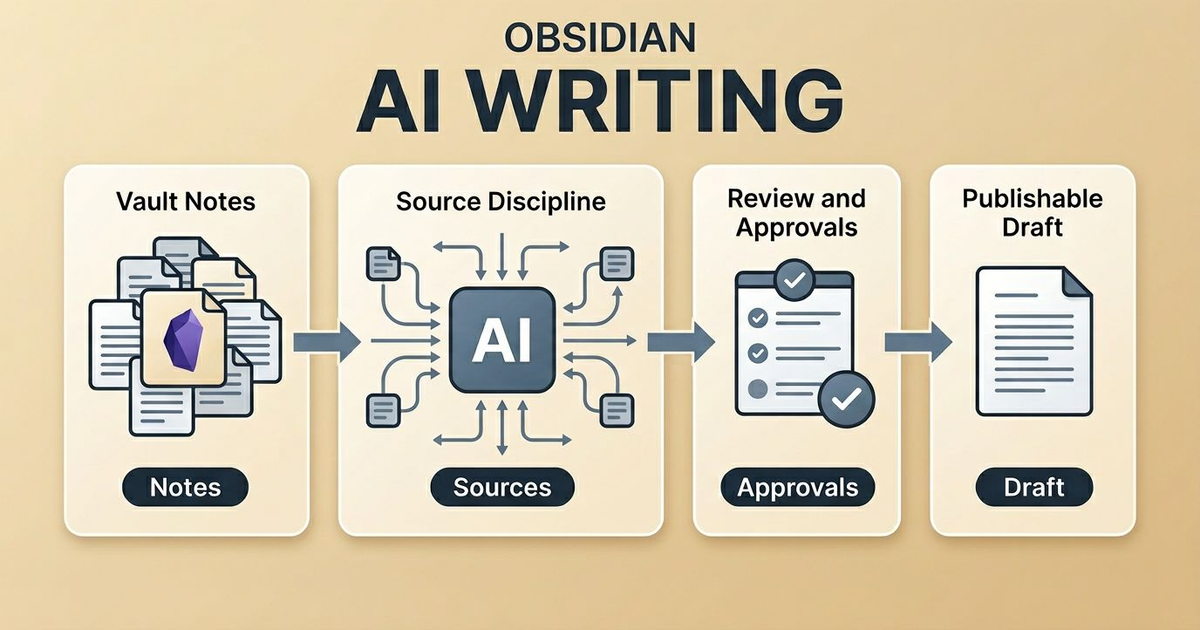
When people ask for an Obsidian AI assistant for writing, I think they usually want the wrong thing.
They ask for a fast drafting tool.
What they actually need is a trustworthy writing system.
If the assistant can write quickly but cannot show its source material, cannot survive review, and cannot keep file changes legible, it is not helping much. It is just making low-confidence prose faster.
That is why my writing workflow in Obsidian is built around evidence and approvals before polish.
What I want an AI writing assistant to do
I do not want AI to replace the note-making part of the work.
I want it to compress, structure, and sharpen what is already in my vault.
That means a useful assistant should help me:
- gather the right notes into one working context
- draft from those notes instead of from vibes
- propose structure without pretending certainty
- show me edits before anything lands in a file
That is the difference between "AI for writing" as a toy and "AI for writing" as a daily system.
The source-hub note is the real writing engine
The most important object in my workflow is not the prompt. It is the source-hub note.
Before I draft, I create one note for the piece and treat it as the center of gravity. That note holds the topic, reader, outcome, relevant excerpts, open questions, and the claims I know I need to verify.
I use a compact scaffold like this:
## Reader and outcome
- Reader:
- Outcome:
- CTA route:

## Claims to verify
- [ ] Claim 1 with note link
- [ ] Claim 2 with note link
- [ ] Claim 3 with note link
The point is not to create more paperwork. The point is to make the source of truth obvious.
Once that note exists, AI stops improvising against a blank screen and starts working against real material. That is also when the rest of the workflow becomes safer.
If you want the underlying setup, the relevant docs start in the vault workflows section.
How I draft from notes without losing trust
I do not run one giant prompt and hope for the best.
I usually draft in three passes.
First, I ask for structure. I want an outline that stays close to the material and ends with a few clarifying questions. That forces missing context to surface early instead of halfway through revision.
Second, I draft section by section from the source-hub note and linked notes. That keeps the model close to the evidence and makes it easier to spot when a section is getting too smooth for what the source material actually proves.
Third, I revise for compression and usefulness. Only after the factual layer feels solid do I start pushing on voice, transitions, and examples.
This is why I think an Obsidian AI assistant for writing should feel more like a disciplined editor than a magical ghostwriter.
Approvals are the trust layer
The biggest difference between a fun writing feature and a durable one is approvals.
I want every meaningful file write to arrive as a reviewable diff.
That gives me three fast checks:
- Did the meaning change?
- Would I actually say this?
- Did the assistant become more confident than the notes justify?
If the answer to any of those is wrong, I reject and rerun.
This is also where the workflow starts to compound. Once review is normal, I can use AI more often without feeling like I am quietly giving away editorial control. That is a better adoption path than trying to earn trust through perfect output on day one.
The mistakes I keep trying to prevent
The first mistake is one-shot drafting. It feels efficient, but it hides where the model got ahead of the material.
The second is treating style as the first problem. It usually is not. Most weak drafts are weak because the structure is vague or the claims are unsupported, not because the sentence rhythm is imperfect.
The third is approving large diffs when I am tired. Large undifferentiated edits are where meaning drift sneaks in.
The fourth is letting prompts live only in chat history. If a prompt pattern is useful, I want it versioned in my vault like any other operating procedure.
If I am careful about those four things, the system stays reliable.
What this workflow is good for
I use it for more than blog posts.
It works well for:
- long-form articles grounded in notes
- project specs built from scattered documentation
- internal writing that needs review and ownership
- summaries where unsupported claims would create real downstream confusion
That is why I pair it with a documented process in the vault workflows guide. The writing assistant is stronger when it lives inside a broader operating loop instead of pretending to be the whole workflow.
My advice if you are setting this up now
Do not optimize for the most impressive first draft.
Optimize for the writing process you would still trust after fifty drafts.
That usually means:
- one source-hub note per piece
- section-level drafting instead of one-shot generation
- diff approvals on file writes
- prompts stored in the vault, not lost in chat history
- one clear CTA route chosen before the conclusion is written
If you want that system inside Obsidian, start with SystemSculpt for Obsidian and the workflow documentation.
I do not think the best AI writing assistant is the one that sounds most human.
I think it is the one that makes your own thinking easier to trust.