SystemSculpt Blog
Teams & OpsUpdated

Master Obsidian Vault Automation with AI Workflows

Optimize your Obsidian vault automation. Build safe AI workflows for summaries, research, and transcription to boost your productivity.

Master Obsidian Vault Automation with AI Workflows article image

Most advice about Obsidian vault automation starts in the wrong place. It starts with plugins, prompts, and flashy demos of auto-linking. Serious vault work starts with consequences. A workflow that drafts a weekly summary can run often. A workflow that rewrites project specs, merges properties, or files notes across a research archive needs review boundaries before anything durable changes.

That distinction matters because a structurally tidy vault isn't the same as a trustworthy one. The often-missed gap is the one between automated linking and authentic thinking. Some practitioners have argued that automating connections can skip the thinking that gives a second brain its value, and that AI-generated notes may need to live in a separate area to preserve traceability of original thought, as discussed in Claude Skills for Obsidian coverage. That's the right place to begin. Automation should remove clerical work, not replace judgment.

Table of Contents

Rethinking Automation Your Philosophy and Strategy

Obsidian vault automation works when it targets repeatable friction with clear boundaries. It fails when it tries to automate thought itself. The useful target isn't “everything that feels manual.” The useful target is “everything repeated often enough that a reusable workflow beats re-deciding each step.”

A diagram titled Your Automation Strategy Framework showing three steps: Goal-Oriented, Iterative Development, and Maintenance Mindset.

Automate recurring friction, not cognition

Good candidates are easy to recognize:

  • Meeting recap extraction: turn raw notes or transcripts into decisions, open questions, and action items.
  • Weekly review summaries: gather daily notes, task logs, and project notes into one reviewable digest.
  • Research synthesis: compare papers, clips, and reading notes without manually copying fragments around.
  • Project spec drafting: pull scattered requirements into one proposed outline for review.
  • Transcript cleanup: turn spoken input into readable Markdown with properties and links.

Poor candidates usually look impressive in demos and weak in practice. Fully automatic linking across a vault can create a graph that looks smart while hiding whether any of those links reflect real understanding. The same problem appears in AI-written evergreen notes that enter the same folders as human-authored notes without any marker.

Practical rule: automate capture, cleanup, summarization, and retrieval first. Keep interpretation, prioritization, and final note structure under human review.

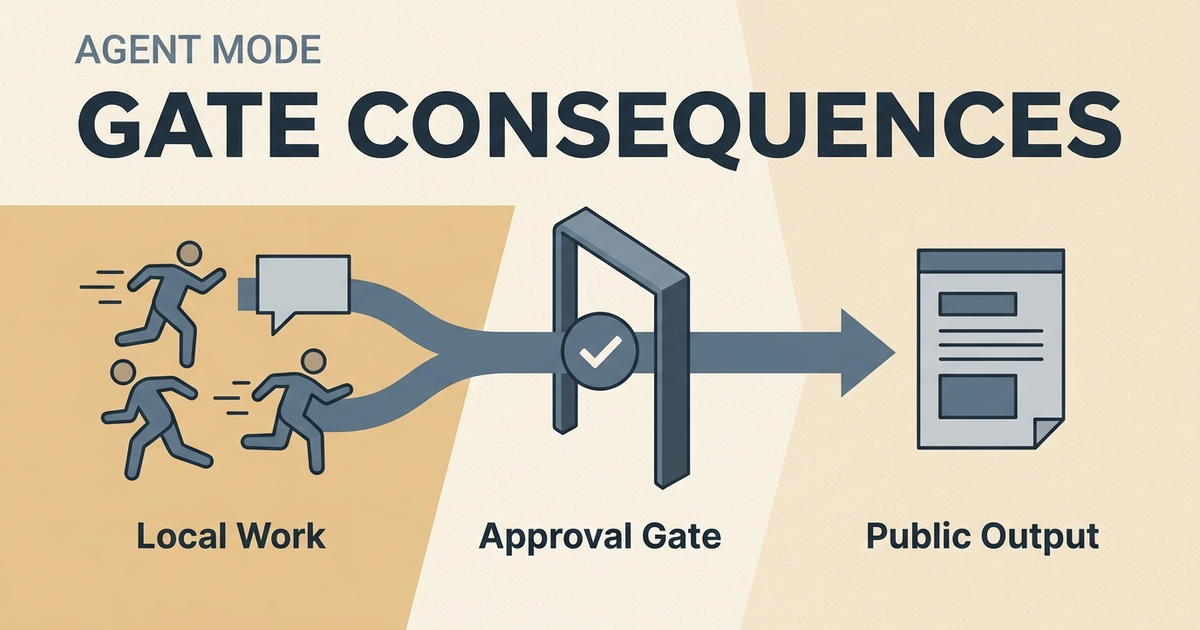
Gate consequences, not effort

Review boundaries should match the damage a workflow could cause.

A safe rule is simple. Low-consequence tasks can run automatically. High-consequence tasks should stop before write-back. That means a transcript can be saved as Markdown immediately, but a workflow that edits permanent notes should present proposed changes first.

A governed setup usually follows this pattern:

  1. Choose a narrow scope. Start with one folder, one project, or one note type.
  2. Define the output. Ask for action items, a summary, cleanup, or a draft, not “improve the vault.”
  3. Retrieve context first. Pull only the notes needed for the job.
  4. Inspect the proposal. Check headings, properties, links, and citations to source notes.
  5. Approve only after review. Durable changes should happen last, not first.

This approach creates something sustainable. It also leaves room for deliberate non-automation. Some notes should stay messy until the writer understands them.

Choosing Your Engine Managed Models vs BYO Keys

The engine choice affects setup friction more than anything else. Most serious users end up choosing between lower-setup managed models and bring your own provider keys. Both can work well inside Obsidian. The right choice depends on how much control is needed over billing, providers, and operations.

A comparison chart showing the differences between managed AI models and bring your own API key options.

When lower-setup managed models fit better

Managed-model setup is the better fit for users who want fewer moving parts. Billing is simpler, setup is faster, and the path from install to first workflow is shorter. For buyers comparing commercial options, SystemSculpt Pro Monthly is listed at $19/month for Obsidian users who want managed AI models, audio transcription credits, semantic search, chat, agents, workflows, and the option to cancel anytime.

That path works well for researchers, students, and writers who don't want to manage provider dashboards, separate quotas, or model compatibility. It also makes sense when the goal is to get recurring summaries, meeting-note extraction, and semantic search running quickly. Pricing details and trade-offs are easier to evaluate on the SystemSculpt pricing page.

Managed models reduce setup. They don't remove the need for workflow design, approval gates, or cost awareness.

When bring your own provider keys fit better

BYO keys fit better when provider control matters more than convenience. The Obsidian plugin SystemSculpt AI supports bring-your-own-provider keys from major providers such as OpenAI and Anthropic, allowing users to bypass managed model subscriptions while retaining full feature access, with no credit card required for free installation and key-only usage, according to the SystemSculpt AI plugin listing.

That path usually makes sense for technical users who already have provider accounts, want specific models, or need tighter control over how spend is allocated across tools. It can also work well for teams testing several model paths before standardizing. A practical comparison of this decision shows up in adjacent documentation tooling too, such as Dokly's AI documentation platform, where the same managed-versus-BYOK trade-off appears for knowledge workflows.

For readers comparing the plugin route directly, the clearest reference point is this Obsidian BYOK AI plugin overview.

Decision factorManaged modelsBYO keys
Setup frictionLowerHigher
BillingBundledSplit across providers
Provider controlModerateHigh
Operational overheadLowerHigher
Best fitFaster startCustom control

The trade-off is straightforward. Managed models reduce setup. BYO keys increase control, but they may also introduce separate provider costs or local hardware considerations depending on the model path.

Implementing Core Automation Workflows

The best Obsidian vault automation patterns are narrow, repetitive, and reviewable. That's why recurring summaries, meeting-note extraction, research synthesis, project-spec drafting, transcript cleanup, and weekly reviews tend to outperform broad “organize my vault” prompts.

A hand-drawn illustration showing a user building an automated workflow process with connected digital task blocks.

Recurring summaries and weekly reviews

A weekly review should pull from existing notes, not invent coherence. A strong template asks for five sections: Wins, Open Loops, Decisions, Risks, and Next Actions. It should also require the AI to cite source notes or clearly mark missing context.

A practical setup looks like this:

  1. Select the source set. Daily notes, meeting notes, task logs, and project pages from the week.
  2. Run retrieval first. Find notes by meaning and keyword before generating anything.
  3. Generate a draft review. Keep it in a review note, not the final archive.
  4. Check each claim. Remove unsupported summaries and unclear action items.
  5. Save after review. Only the reviewed version becomes durable.

Useful references for this pattern include vault workflow docs, weekly review template ideas, and pro resources for advanced setups.

A summary is only as good as its retrieval set. Weak context produces polished nonsense.

Meeting notes and transcript cleanup

Audio is one of the clearest automation wins because the raw material is messy and the desired output is stable. A documented local workflow processed a 30-second voice memo in approximately 4 seconds through OGG conversion to 16kHz mono WAV, transcription through whisper-cli, and local routing, while monthly operational cost for the full stack ranged from $8 to $15, as described in this Obsidian automation write-up.

That doesn't mean every user should rebuild that stack. The transferable lesson is the workflow shape:

  • Capture audio quickly: spoken notes are often easier than typing when context is still fresh.
  • Transcribe to Markdown: keep transcripts searchable inside the vault.
  • Clean before filing: remove filler, identify speakers if possible, and isolate decisions.
  • Extract outcomes separately: create action items, blockers, and follow-ups as a proposed layer.
  • Review write-back: approve changes before they touch durable project notes.

A concrete example of this pattern appears in meeting notes to action items.

After the process is clear, a walkthrough helps show how the pieces fit in practice.

Research synthesis and project specs

Research synthesis should combine retrieval, comparison, and citation discipline. The model should see the notes that matter, then produce a draft with explicit uncertainty where context is thin. That keeps synthesis from turning into confident compression.

Project specs work similarly. Start with a narrow folder or note set, define the goal, retrieve the relevant material, inspect proposed edits, approve or reject, and save only after review. Blind bulk edits aren't a serious workflow. They're a repair project waiting to happen.

For ongoing upkeep, maintenance automation guidance helps keep recurring jobs from piling up or drifting out of scope.

Task automation handles inputs and outputs. Semantic retrieval changes what the vault is between those moments. Instead of depending on exact file names or remembered tags, the vault becomes something that can find notes by meaning.

Screenshot from https://systemsculpt.com/obsidian-ai-plugin

What hybrid retrieval changes

In large vaults, hybrid retrieval matters because keyword search and semantic search solve different failures. Keywords catch exact matches, names, acronyms, and repeated phrasing. Semantic search across a vault catches adjacent concepts, paraphrases, and older notes whose wording no longer matches the current query.

One published note system has grown to over 20,000 notes across more than four years, showing that AI-enabled automation workflows and hybrid retrieval can scale for large Markdown vaults while maintaining structure, as described in this Obsidian Starter Kit write-up. Separate reporting on semantic retrieval in Obsidian notes that combining keyword and meaning-based search can reduce the time to locate relevant notes by up to 60%, according to SystemSculpt's semantic search overview.

A practical starting point is embeddings and search documentation.

Common indexing hurdles

The usual problems aren't exotic. They're structural.

  • Inconsistent note naming: similar ideas end up split across naming styles.
  • Duplicate notes: retrieval returns fragments that say the same thing in different places.
  • Noisy transcripts: spoken filler pollutes results unless cleaned.
  • Old project residue: archived work crowds out current relevance.
  • Overly broad context windows: too much context lowers answer quality.

Test known queries before automating around retrieval. If the vault can't reliably find a note that should obviously match, the indexing and note structure need work first.

For readers who think about embeddings as a data-preparation problem, the same cleanup logic appears in other ML contexts. This short piece on Captapi for ML data preparation is useful because it frames transformation quality as upstream work, not a downstream magic trick.

Long-Term Maintenance Security and Cost Control

A vault with automation is a system that needs tending. Most breakage doesn't come from one catastrophic action. It comes from neglected templates, stale workflows, weak review habits, and unclear spending boundaries.

Keep workflows narrow and observable

A documented Obsidian setup process using templates, QuickAdd, capture plugins, Commander UI actions, and Bases takes approximately 15 minutes for full setup and can reach 90 to 95% success in consistent note creation, while the most common pitfall affects about 30% of users through template variable misconfiguration, according to this academic vault automation guide.

That lesson matters beyond academic use. Most maintenance work is boring and structural:

  • Review old automations: remove workflows that no longer match current folders or note types.
  • Check template variables: broken placeholders inadvertently create bad notes.
  • Constrain write scopes: keep agents pointed at a narrow note set.
  • Inspect context before sending: know what content is included in each AI request.
  • Archive noisy inputs: transcripts, imports, and raw captures often need separate staging areas.

Security and privacy depend on the chosen model path. Managed models, external provider APIs, and local or compatible model setups each create different trade-offs. No serious guide should promise more than the selected provider and workflow support.

Watch templates, credits, and provider spend

Cost control is easier when each workflow has an owner and a purpose. A vault doesn't need one generic “AI mode.” It needs separate policies for chat, semantic indexing, transcription, and agent write-backs.

One option in this category is SystemSculpt, an Obsidian-native plugin with chat, hybrid semantic and keyword search, transcription, document workflows, image generation, and approval-gated agent actions inside a Markdown vault. It supports managed models and bring your own provider keys. Managed usage isn't unlimited free usage, and BYOK can introduce separate provider charges or local hardware costs depending on the path. Public pricing also lists a $149 one-time lifetime license, with credit packs at $19, $49, and $99 for heavier hosted operations on the pricing page.

A simple cost routine helps:

  1. Track which workflows run often. Recurring summaries and transcription usually deserve separate monitoring.
  2. Review indexing scope. Not every folder needs embeddings.
  3. Use managed models for convenience-heavy work. Save BYOK for provider-specific control.
  4. Retire redundant automations. Duplicate workflows create duplicate spend.
  5. Audit outputs, not just costs. Cheap low-quality automation still wastes time.

For teams evaluating deployment posture in adjacent open model stacks, Secure OpenClaw deployments is a useful reference point because it frames governance as an operational practice, not a marketing claim.

Conclusion From Automated Tasks to Augmented Thinking

Obsidian vault automation is most useful when it behaves like disciplined clerical help. It should capture faster, summarize recurring work, clean transcripts, surface related notes, and propose changes for review. It shouldn't pretend to understand the vault better than the person who depends on it.

The durable pattern is simple. Start with one repetitive task. Keep the scope narrow. Retrieve context before generating output. Review AI changes before they touch notes. Expand only after the workflow earns trust.

That approach produces a vault that stays usable under real workload. The result isn't a more decorative graph or a more automated archive. It's a system that supports better thinking while keeping Markdown notes under human control.


SystemSculpt can be a practical fit for Obsidian users who want chat, semantic search across a vault, audio transcription saved as Markdown, and approval-gated agent actions without leaving their notes. Readers who want to compare managed-model setup, bring your own provider keys, docs, and pricing can start with the Obsidian AI plugin page, review setup and workflow documentation, or check current options on the pricing page.

Keep Reading

Related posts

More build notes and rollout patterns connected to the same themes.

Get new posts by email

Occasional updates on new features, workflows, and templates. No spam.

Next Move

Try SystemSculpt inside your vault

If you are here for Obsidian + AI workflows, the plugin is the fastest way to get them running inside your actual notes instead of recreating them in detached tools.